




Blog

Chevy Blazer vs. Chevy Trailblazer: Which SUV Is Right for You?

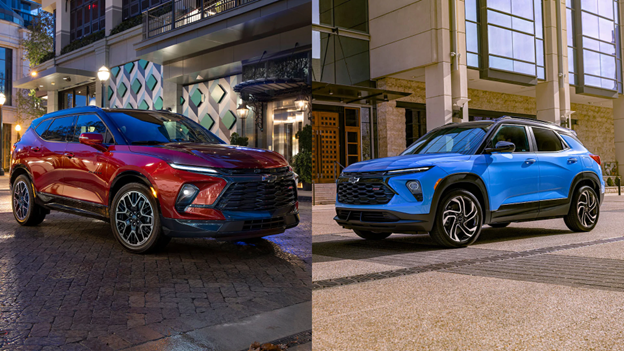
Chevy Blazer vs. Chevy Trailblazer

Choosing the right SUV can be challenging, especially with options like the Chevy Blazer and Chevy Trailblazer on the market. Both SUVs are designed to meet the needs of modern drivers, offering a range of features to suit different preferences. Whether you’re focused on performance, fuel efficiency, or interior space, understanding the key differences between these two vehicles is essential. In this detailed comparison, from Jet Chevrolet, part of Dinsmore Auto Group, we’ll break down various aspects, from engine options and towing capacity to cargo space and safety features, to help you decide which model fits your lifestyle.

Overview: The Chevy Blazer vs. The Chevy Trailblazer
The Chevy Blazer and Chevy Trailblazer may share similar names, but they cater to distinct audiences. The Blazer is a midsize SUV known for its sporty design and robust performance, while the Trailblazer is a compact SUV aimed at urban drivers and those seeking efficiency.

● Chevy Blazer: Positioned as a sportier, larger SUV, the Blazer combines bold aesthetics with powerful performance features, making it ideal for families and those who enjoy a more aggressive driving style.
● Chevy Trailblazer: The Trailblazer, by contrast, focuses on versatility and affordability. It’s compact and efficient, designed for city dwellers or anyone needing a practical daily driver.

Both models are available at dealerships like Jet Chevrolet and Dinsmore Auto Group, where you can experience their unique features firsthand.

Engine Options and Performance

Chevy Blazer:
● Engine Choices: The Blazer offers two engine options: a 2.0-liter turbocharged four-cylinder engine that produces 228 horsepower and a more powerful 3.6-liter V6 engine delivering 308 horsepower.
● Driving Style: The Blazer’s powerful V6 makes it ideal for drivers who crave a dynamic and engaging experience. Its sport-tuned suspension enhances handling, especially on winding roads.
● Towing Capacity: The Blazer can tow up to 4,500 pounds when equipped with the V6 engine, making it a strong choice for families who need to haul trailers or small boats.

Chevy Trailblazer:
● Engine Choices: The Trailblazer comes with two three-cylinder turbocharged engine options: a 1.2-liter engine with 137 horsepower and a 1.3-liter engine generating 155 horsepower.
● Driving Style: The Trailblazer is designed for efficiency and comfort rather than speed. It’s agile and easy to maneuver, making it well-suited for city driving and tight parking spaces.
● Towing Capacity: The Trailblazer has a maximum towing capacity of 1,000 pounds, suitable for small trailers or light recreational equipment

When it comes to engine performance, the Blazer is the clear winner for those prioritizing power and towing capacity. However, the Trailblazer excels in urban environments where maneuverability and efficiency are more important.

Fuel Efficiency: Which SUV Saves You More at the Pump?

Chevy Blazer:
● The Blazer’s fuel efficiency varies by engine. The 2.0-liter turbo engine offers an EPA-estimated 22 mpg city and 29 mpg highway, while the 3.6-liter V6 provides 19 mpg city and 27 mpg highway.

Chevy Trailblazer:
● The Trailblazer’s smaller, more efficient engines deliver impressive fuel economy. The 1.2-liter engine gets an EPA-estimated 28 mpg city and 31 mpg highway, while the 1.3-liter engine improves slightly with 29 mpg city and 33 mpg highway.

For those prioritizing fuel efficiency, the Trailblazer is the better option. Its smaller engines are more economical, making it an excellent choice for daily commutes or long road trips.

SUV Size and Interior Space

Chevy Blazer:
● SUV Size: As a midsize SUV, the Blazer offers more space inside and out. It has a more commanding presence on the road and a larger footprint, making it ideal for families.
● Cargo Space: The Blazer provides up to 30.5 cubic feet of cargo space behind the rear seats and up to 64.2 cubic feet with the rear seats folded down. This is perfect for road trips, grocery runs, or transporting large items.

Chevy Trailblazer:
● SUV Size: The Trailblazer’s compact size makes it easier to park and navigate in tight spaces. It’s a great fit for urban environments where space is limited.
● Cargo Space: Despite its smaller size, the Trailblazer is surprisingly spacious. It offers 25.3 cubic feet of cargo space behind the rear seats and up to 54.4 cubic feet with the rear seats folded.

If you need more room for passengers and cargo, the Blazer is the better choice. However, if you’re looking for a smaller SUV that doesn’t compromise too much on interior space, the Trailblazer is worth considering.

Chevy Technology: Advanced Features in Both Models
Both the Blazer and Trailblazer are equipped with Chevy technology that enhances the driving experience.

Chevy Blazer:
● Infotainment System: The Blazer comes with an 8-inch touchscreen infotainment system, Apple CarPlayAndroid Auto, and built-in navigation. Higher trims offer features like a premium Bose sound system and a wireless charging pad.
● Driver Assistance: The Blazer includes advanced safety features like adaptive cruise control, rear cross-traffic alert, and a 360-degree camera system.

Chevy Trailblazer:
● Infotainment System: The Trailblazer features a 7-inch touchscreen, with an optional upgrade to an 8-inch screen. It also supports Apple CarPlay and Android Auto. While it may not have as many luxury options as the Blazer, it still offers a strong tech package.
● Safety Features: The Trailblazer comes standard with Chevy Safety Assist, which includes automatic emergency braking, lane keep assist, and forward collision alert.

Both SUVs are packed with technology, but the Blazer offers more high-end features, making it a better choice for tech-savvy drivers.

Chevy Safety Features: Keeping You and Your Family Safe
Safety is Chevrolet's top priority. Both the Blazer and Trailblazer are equipped with comprehensive Chevy safety features.

Chevy Blazer:
● Standard Safety: The Blazer includes features like a rearview camera, rear seat reminder, and Teen Driver technology. Higher trims offer advanced safety packages, including blind-spot monitoring and automatic emergency braking.
● Optional Upgrades: You can add additional features for additional protection, such as adaptive cruise control and a rear cross-traffic alert system.

Chevy Trailblazer:
● Standard Safety: The Trailblazer comes with Chevy Safety Assist, a suite of six advanced features, including automatic emergency braking and lane keep assist.
● All-Around Protection: Even in its base trims, the Trailblazer offers plenty of safety technology to ensure peace of mind on the road.
Both SUVs are designed with safety in mind, but the Trailblazer offers more standard features, making it a strong choice for budget-conscious families.

Conclusion: Which Chevy SUV Is Right for You?

Choosing between the Chevy Blazer and Chevy Trailblazer depends on your specific needs and lifestyle. If you’re looking for a powerful, sporty midsize SUV with impressive towing capacity and more luxurious features, the Blazer is the way to go. It’s perfect for families and those who enjoy a more aggressive driving style.
On the other hand, if fuel efficiency, easy maneuverability, and budget-friendly pricing are your priorities, the Trailblazer is an excellent option. It’s compact yet spacious enough for everyday use and comes loaded with standard safety features.
To explore these models in person, visit Jet Chevrolet to test drive and see which SUV fits your lifestyle best.

*Penned by AI, polished by humans

Recommended Posts

Giving an employee keys to a company work vehicle

When Should a Business Move From Employee Vehicles to Company-Owned Work Vehicles?

Many small trade businesses start with employees using their own vehicles for occasional work-related driving. As the company grows, however, there may come a point when dedicated company work vehicles make more sense. There isn't a universal fleet size where that transition should happen. The better question is whether personal vehicles still fit the way the business operates. When Personal Vehicles Can Work For occasional business driving, using employee-owned vehicles can be a practical arrangement. Businesses may reimburse employees for qualifying business mileage or vehicle expenses under an appropriate reimbursement policy. However, occasional trips are different from asking an employee's personal vehicle to function as a work vehicle every day. Look at What Employees Are Actually Doing As field work increases, consider how employees are using their personal vehicles. Are they regularly traveling between job sites? Carrying company tools or materials? Making frequent customer visits? Towing or transporting equipment? Putting substantial business mileage on their own vehicles? If business use has become a major part of the vehicle's daily role, it may be worth evaluating whether a company-owned vehicle is a better fit. Company Vehicles Give the Business More Control With a company-owned work vehicle, the business chooses the vehicle based on the work it needs to perform. The company can also establish consistent policies for authorized drivers, maintenance, fuel, vehicle use, and equipment. That's different from relying on employees' personal vehicles, which may vary considerably in age, condition, capability, and suitability for the work. Insurance should also be reviewed carefully whenever employees drive for business, whether they use personal or company vehicles. The appropriate coverage depends on the business and how the vehicles are used. Consider the Employee Side Too Regularly using a personal vehicle for work can mean additional mileage and wear for the employee. A reimbursement program can address qualifying business vehicle expenses, but it doesn't necessarily answer the broader operational question of whether an employee's personal car or truck is the right vehicle for the job. As a company adds crews or expands its service territory, providing work vehicles may become part of building the infrastructure needed to support field operations. Plan for the Transition to Company Vehicles Moving to company-owned vehicles gives a business greater control over how its work vehicles are selected, maintained, and used. It also means bringing expenses such as insurance, maintenance, registration, fuel or charging, and fleet administration into the company's operating plan. Clear vehicle-use policies are important as well. If employees are allowed to commute or use company vehicles personally, there may be tax and recordkeeping considerations depending on the circumstances, so businesses should work with their tax and insurance professionals when establishing those policies. Planning for these responsibilities from the beginning can help a business build a fleet that supports its crews and continues to work as the company grows. Is your business reaching the point where dedicated work vehicles make sense? Connect with the Jet Chevrolet team at (253) 336-4216 to discuss your commercial vehicle needs. Do More. Save More. Experience MORE. Final Thoughts Employee-owned vehicles can work well when business driving is limited. But, as crews spend more time on the road and vehicles become more important to daily operations, dedicated company work trucks may deserve a closer look. Consider how often employees drive for work, what they're carrying, what the job requires, and how much control the business needs over its vehicles. The right time to build a company fleet is different for every business, but the decision should follow how the company actually operates.

Tracking statistics about a commercial fleet vehicle

The First 90 Days With a New Fleet Vehicle: What Businesses Should Track

Adding a new work truck or commercial vehicle to your fleet is only the beginning. The first few months of actual use can tell you whether the vehicle is performing the job you purchased it to do. Instead of waiting until the end of the year to evaluate a new vehicle, use its first 90 days to establish a baseline. Mileage, fuel use, maintenance needs, utilization, and feedback from the employees using the vehicle can all provide useful information for future fleet decisions. Start With a Clear Vehicle Record Before the vehicle enters regular service, document the basics. Record the VIN, vehicle configuration, assigned driver or crew if applicable, in-service date, initial mileage, and any accessories or upfits installed on the vehicle. Keep relevant warranty, maintenance, and vehicle documentation accessible as well. Starting with accurate records gives you something to reference later when reviewing operating history or comparing vehicles within the fleet. Track How Much the Vehicle Is Actually Used One of the simplest things to measure is utilization. Depending on the type of work vehicle, useful measurements can include: Miles driven Days in use Number of trips Engine hours, when relevant Type of work or routes the vehicle regularly handles After 90 days, compare actual use with what you expected when the vehicle was purchased. A truck intended for daily field work may be operating differently than anticipated, and that information can be useful when deciding what the next vehicle should look like. Establish a Fuel-Use Baseline Record fuel purchases and mileage consistently from the beginning. The goal isn't necessarily to decide whether a vehicle is “good” or “bad” based on its first few tanks. Fuel consumption can be affected by driving conditions, load, routes, idling, weather, and how the vehicle is used. Instead, the first 90 days can provide an initial operating baseline that can be compared with the vehicle's performance over time or with similar vehicles performing similar work. Fuel consumption and mileage are commonly tracked together as part of fleet performance monitoring. Get Feedback From the People Using It Numbers don't tell you everything. Ask the employees who regularly use the vehicle whether it fits the work. Are they frequently carrying passengers? Is the vehicle being used for the jobs you expected? Are there features or equipment they use constantly? Is something about the configuration making routine work unnecessarily difficult? This doesn't mean every preference requires a change. The goal is to identify patterns that could inform the next vehicle purchase or upfit. Review the Vehicle at 30, 60, and 90 Days You don't need a complicated reporting system to learn from a new fleet vehicle. A simple review at roughly 30, 60, and 90 days can help answer: Is the vehicle being used as expected? Look at mileage, trips, routes, assignments, and the work it's performing. Is the configuration working? Talk with the employees using it and note recurring issues or needs. What is it costing to operate so far? Review fuel and any maintenance or other vehicle-specific operating expenses you've chosen to track. At 90 days, you should have a clearer picture of how the vehicle fits into the business than you had on the day you bought it. Use What You Learn on the Next Purchase The greatest value of tracking a new vehicle may come when it's time to buy another one. If a particular configuration works well, you have real-world experience supporting that decision. If the vehicle is consistently being used differently than expected, that information can help you reconsider the next purchase. Over time, keeping consistent records across multiple vehicles can give a business its own operating history rather than relying entirely on assumptions when making fleet decisions. Fleet utilization data is commonly used to inform acquisition, allocation, and replacement planning. Adding or replacing a commercial vehicle? Connect with the Jet Chevrolet team at (253) 336-4216 to discuss your business and fleet needs. Do More. Save More. Experience MORE. Final Thoughts The first 90 days with a new fleet vehicle are an opportunity to learn whether the vehicle fits the job it was purchased to perform. Track how it's used, what it costs to operate, how employees work with it, and whether the original configuration still makes sense after real-world use. Those early observations can help turn one vehicle purchase into better information for the next fleet decision.

Commercial Fleet Vehicles

How Many Work Vehicles Does Your Business Actually Need?

As a business grows, knowing when to add another work vehicle isn’t always obvious. A contractor may have enough trucks most days but run short when multiple crews need to be in different places. Another business may have vehicles sitting often enough that adding another one doesn’t make sense yet. That’s where fleet sizing comes in. Fleet sizing is about matching the number and types of commercial vehicles you operate to the work your business actually performs. Start With How Your Vehicles Are Actually Used Mileage alone doesn’t tell you whether your fleet is the right size. A local service van may accumulate relatively few miles while still being needed every day. Instead, look at how frequently each vehicle is needed. Are most working every day? Are certain trucks constantly requested by multiple employees? Are others regularly sitting unused? The goal is to understand whether your current fleet has enough capacity to support the work your crews are ready to perform. Watch for Vehicle Scheduling Conflicts One of the clearest signs that a business may be outgrowing its fleet is when vehicle availability starts affecting scheduling. Watch for situations like: Two crews regularly needing the same vehicle Employees waiting for a vehicle before leaving for a job Jobs being scheduled around vehicle availability Frequent vehicle reassignment between crews A specialized truck being unavailable when needed An occasional conflict is normal. When it becomes routine, vehicle availability may be creating a bottleneck. Think in Crews, Not Just Employees Ten employees don’t necessarily require ten vehicles. A service business with technicians traveling independently may need more vehicles than a contractor whose employees travel together in crews. A better question is: How many crews need to operate independently at the same time? Then consider what each crew needs to carry, tow or access throughout the day. Plan for Growth Your current workload isn't the only factor. If you're hiring technicians, adding another crew, expanding your service territory or taking on more work, your vehicle needs may grow along with the business. Ideally, vehicle planning happens alongside hiring and expansion, not after a new employee is ready to work and there isn't an appropriate vehicle available. Make Sure You Have the Right Mix of Vehicles Fleet sizing isn't only about how many vehicles you have. It's also about what those vehicles can do. Service vans, pickups, towing vehicles and specialized work trucks may serve completely different roles. A business can have enough vehicles overall and still experience shortages if too few are equipped for a particular job. Also consider what happens when a key vehicle is unavailable for maintenance or repairs. If losing one truck immediately disrupts the schedule, that may be worth factoring into future fleet planning. When Does Adding Another Vehicle Make Sense? Before expanding your fleet, consider: Are vehicle conflicts happening regularly? Are you adding another independently operating crew? Is the business expanding into a larger service area? Do you need capabilities your existing vehicles don't provide? Would another vehicle allow your team to complete additional work? Is the need consistent rather than just seasonal? If there’s a clear answer, it may be time to evaluate additional fleet capacity. Why Western Washington Businesses Work With Jet Chevrolet Located in Federal Way along the I-5 corridor, Jet Chevrolet works with commercial customers throughout Western Washington, including Federal Way, Tacoma, Kent, Auburn, Puyallup, Olympia, Seattle, Bellevue, Renton, Everett and Lynnwood. As part of Dinsmore Auto Group, Jet Chevrolet is locally owned and family operated. Our commercial team works with businesses to evaluate vehicle options based on their work and fleet requirements. Do More. Save More. Experience MORE. As your business adds employees, crews, customers or service areas, your commercial vehicle needs may change with it. Planning to add another work truck or commercial vehicle? Connect with the Jet Chevrolet team at (253) 336-4216 to discuss your fleet needs. Final Thoughts There isn't one vehicle-to-employee ratio that works for every business. The right fleet size depends on how your crews operate, what your vehicles need to accomplish and where your business is headed. When vehicle availability starts limiting the work your team is ready to perform, it may be time to consider adding capacity.